
Attendance, results and fees, all in one simple app
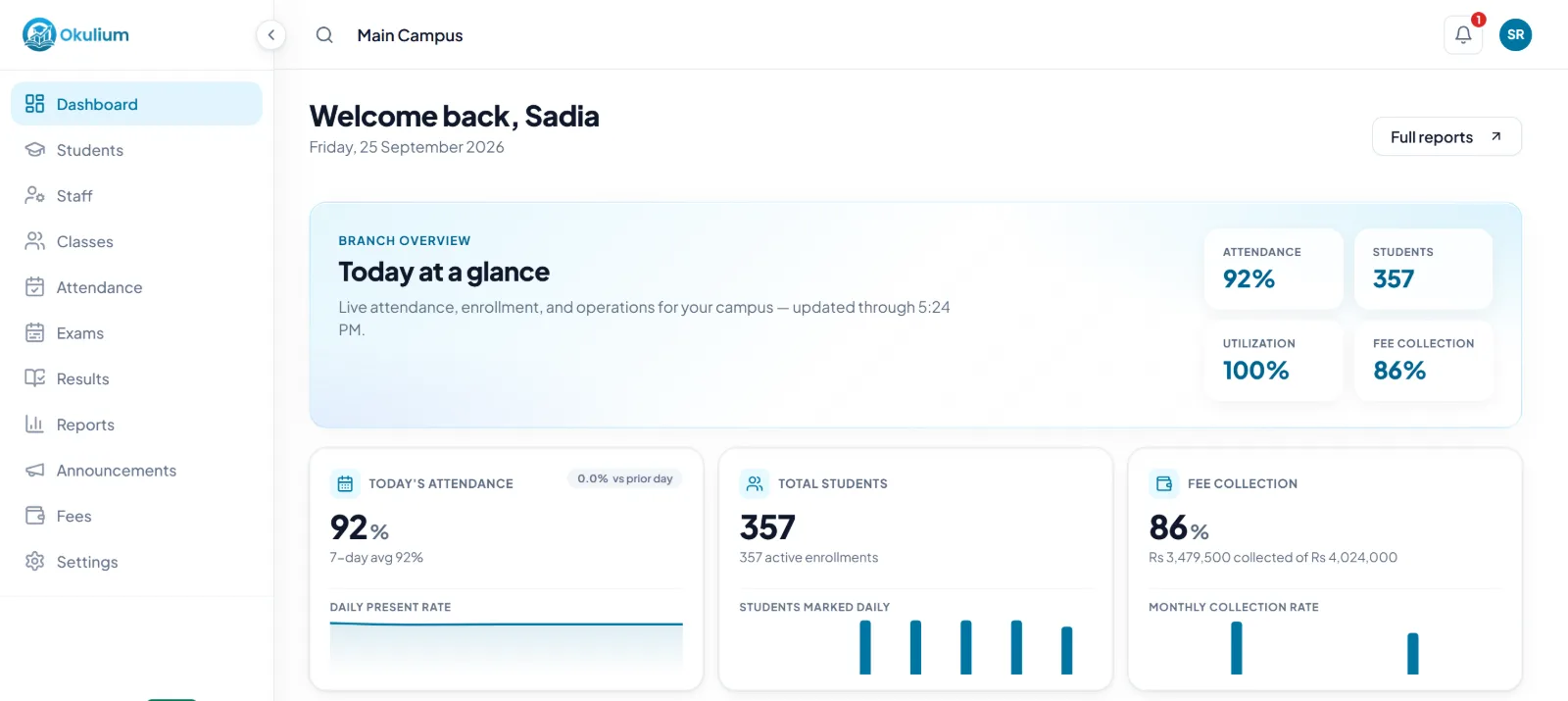
School management for Pakistan. Teachers mark attendance on their phones, report cards and bank-ready fee challans are ready in a click, and parents see attendance, results, fees and notices as soon as you publish them.
- 30 days free, with every feature
- No payment to start
- Help on WhatsApp
Made for the way schools in Pakistan work
Mobile number sign-in
Staff and parents sign in with the mobile number they already use, written with 0 or +92.
Bank-ready fee challans
Student, school and bank copies with your bank account, late fee, amount in words and a barcode, stamped PAID once settled.
Pakistani subjects, ready
Subject sets for primary, middle, Matric and higher secondary classes, from Islamiat to Pakistan Studies.
Pay the way you already do
Pay for Okulium by bank transfer, Raast, JazzCash or Easypaisa, monthly or yearly.
Features
Everything your school does every day
The register, exams, fees, parents and ID cards, in one place. Every teacher and parent sees just their own part.
Attendance
The register, done in a minute
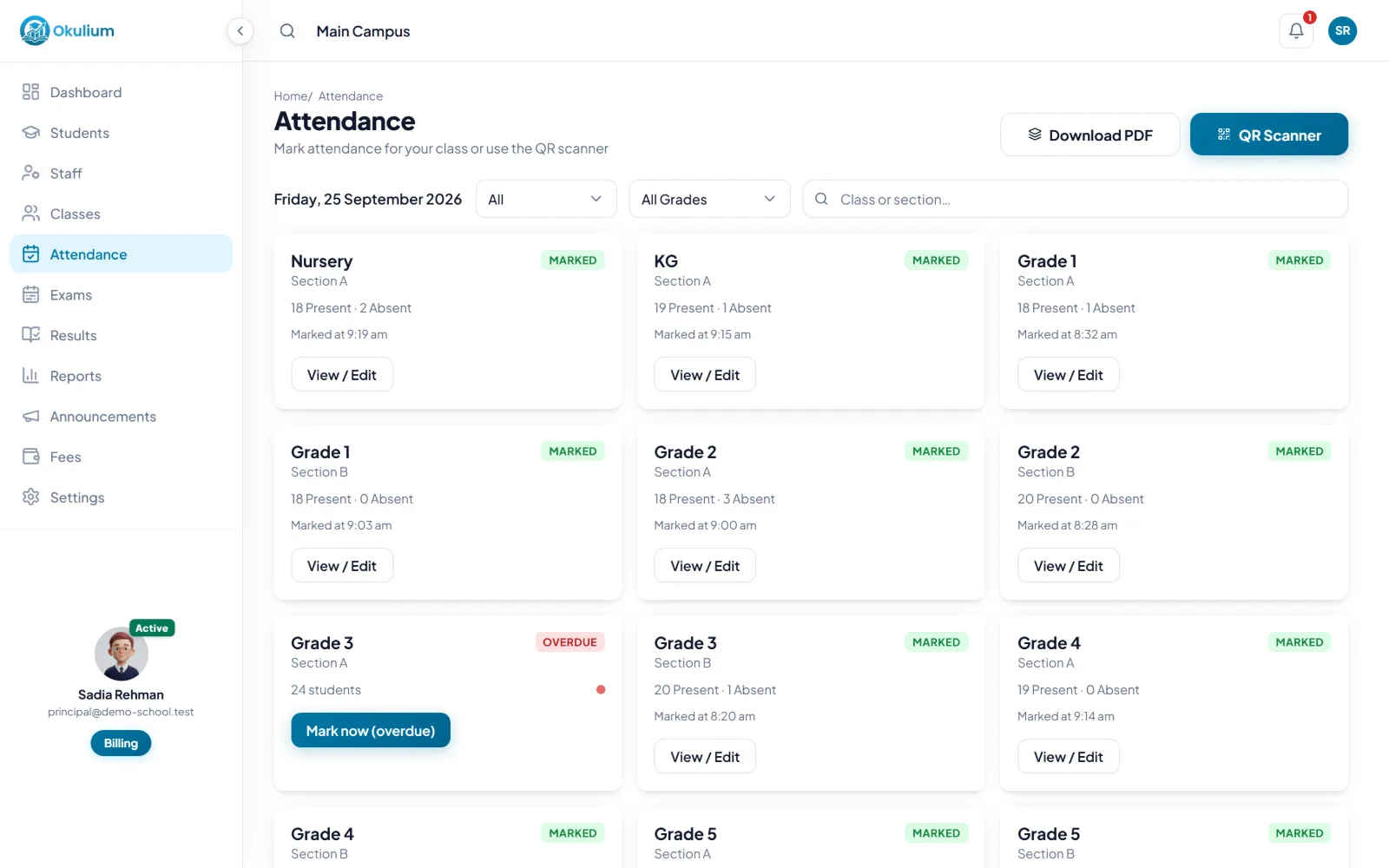
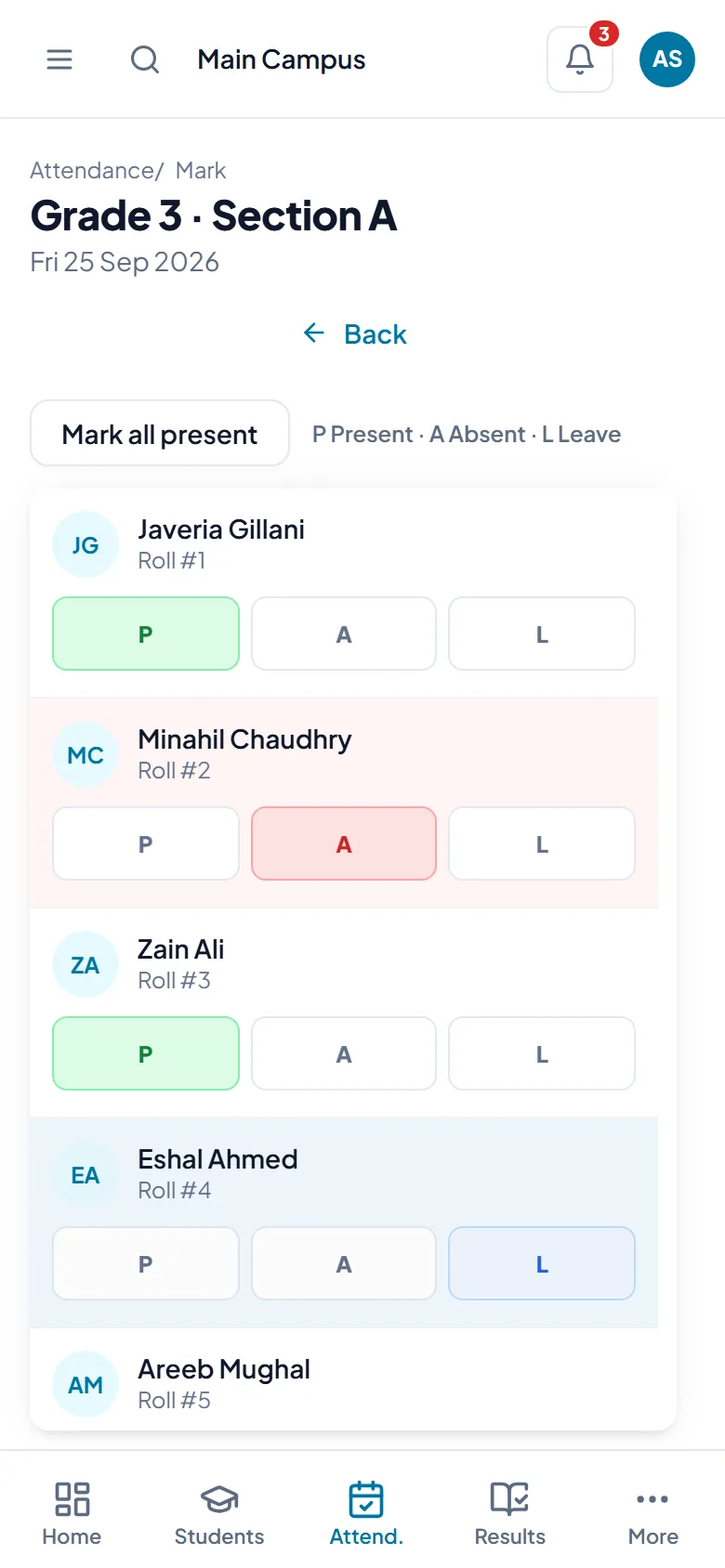
Class teachers take the register on their own phone. One tap marks the whole class present, then they change the few who are absent or on leave.
- Parents of absent children are told in the Okulium app as soon as the register is in
- Late registers are flagged, and the office gets one summary after your cut-off time
- Scan the QR code on a student's ID card to mark them present
- Holidays on the school calendar and your weekly days off are skipped automatically
- Every correction needs a reason and stays on record
Exams and results
From marks to report cards, without Excel
Subject teachers enter marks for their own subjects. Class teachers check and submit each section, and the exam office releases the results when everything is in.
- Your own grades and pass mark, with positions in each section worked out for you
- A marks-due date for every exam, with each teacher's marking progress
- Class analytics: averages, pass rate and subject trends
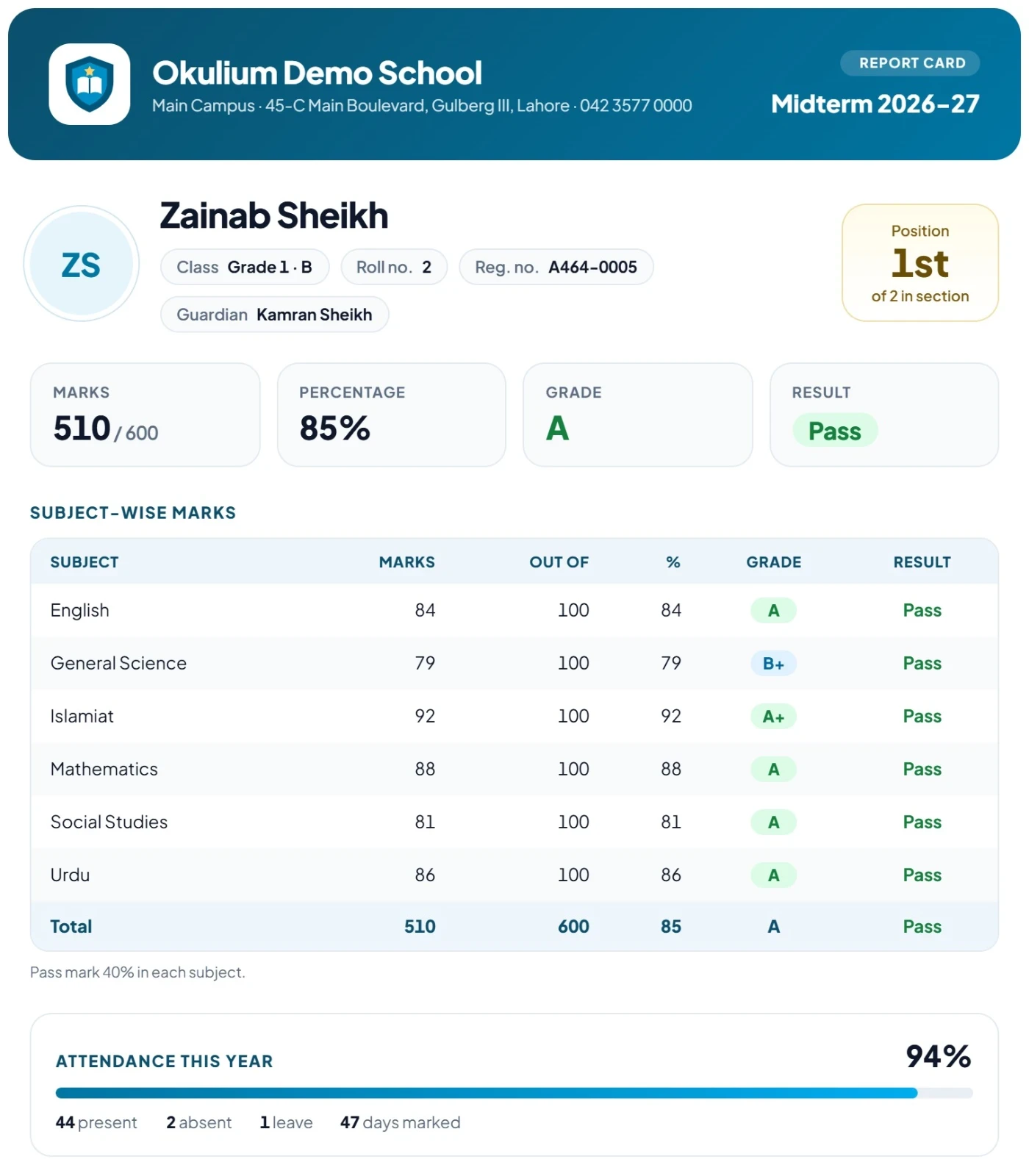
- Report cards with your logo, attendance and the principal's name, saved as a PDF
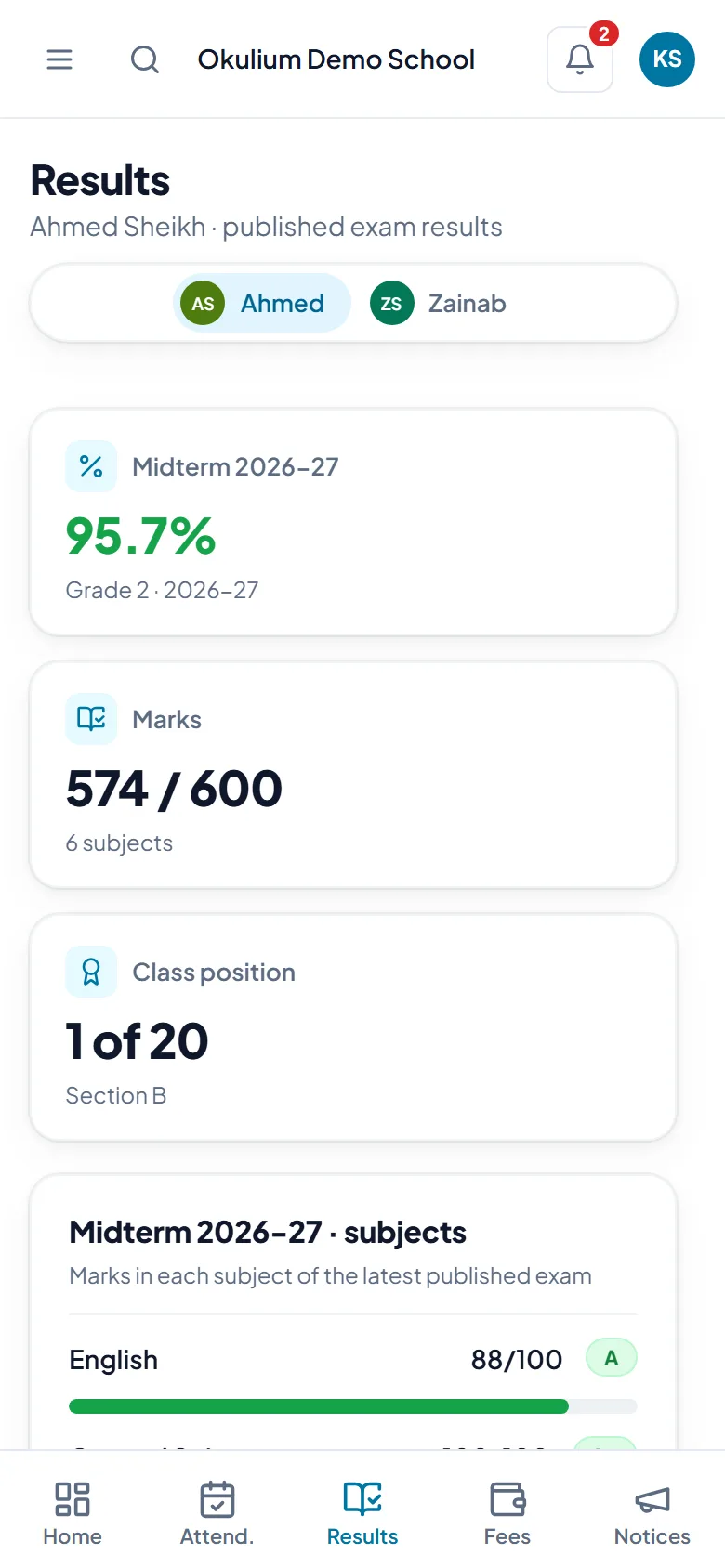
- Parents see the result, subject by subject, the moment you release it
Fees
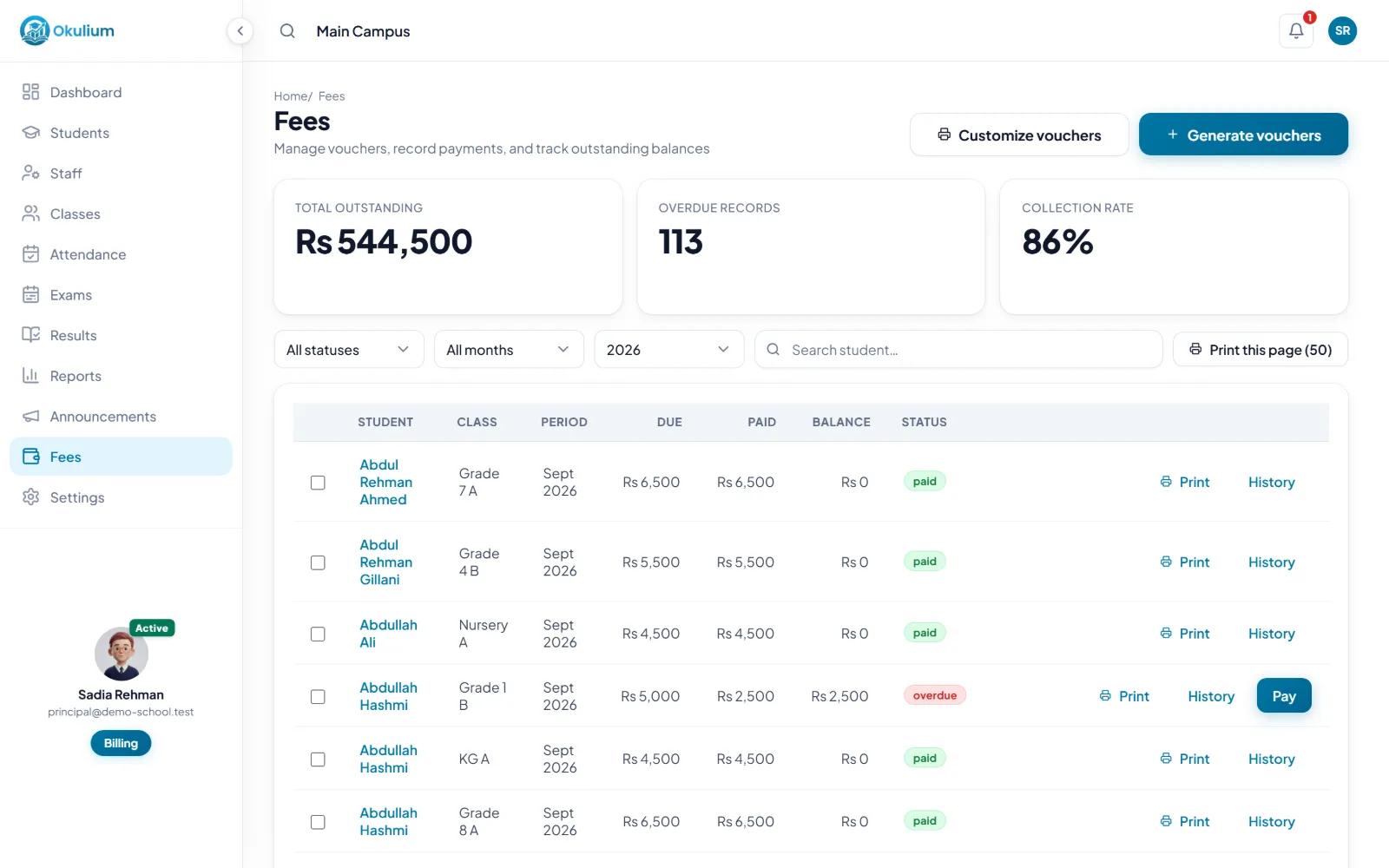
Bank-ready fee challans, balances at a glance
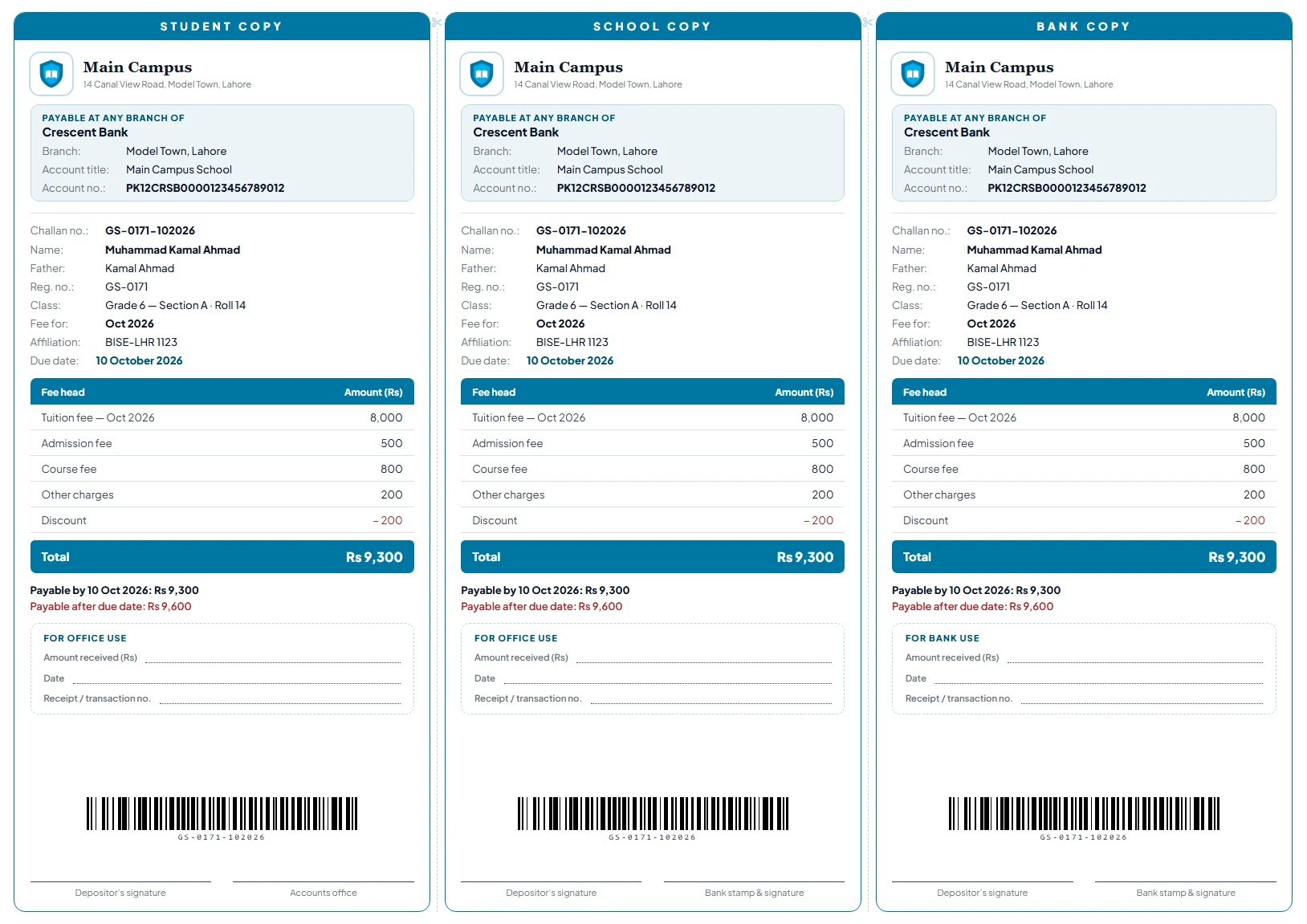
Make a month's challans for a whole section at once, with student, school and bank copies. Pick one of six designs, from a bank challan to a three-part portrait slip, in your school's colours.
- Your bank account, a late fee after the due date and a barcode on every copy
- Part payments, receipt numbers, discounts and overdue tracking
- Unpaid dues from your old system carried over as previous dues
- An outstanding fees report you can export to Excel or PDF
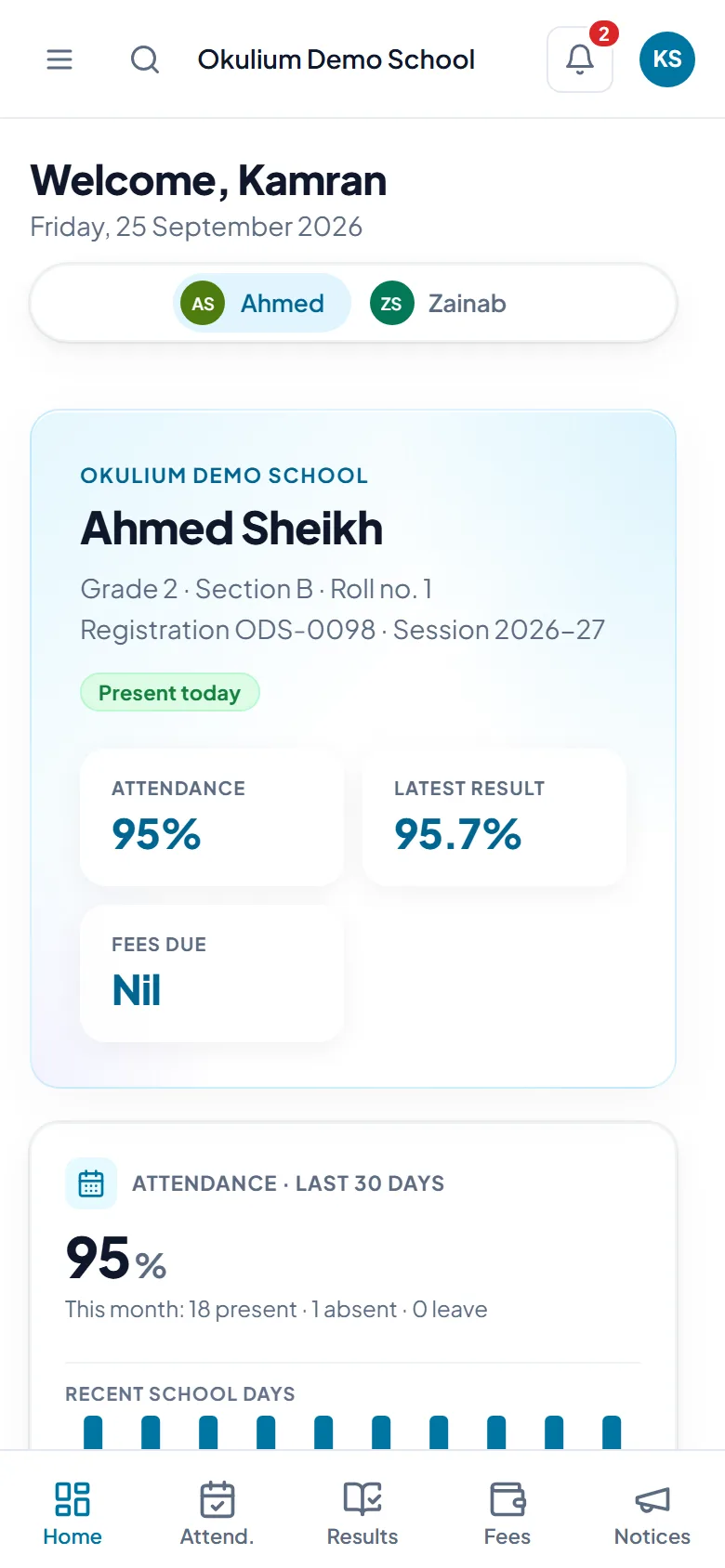
- Parents see what's due and what's paid in their app
Parent app
Parents stay informed, without calling the office
Parents sign in with their mobile number and see attendance, results, fees and notices for each of their children.
- One sign-in for brothers and sisters, even at different Okulium schools
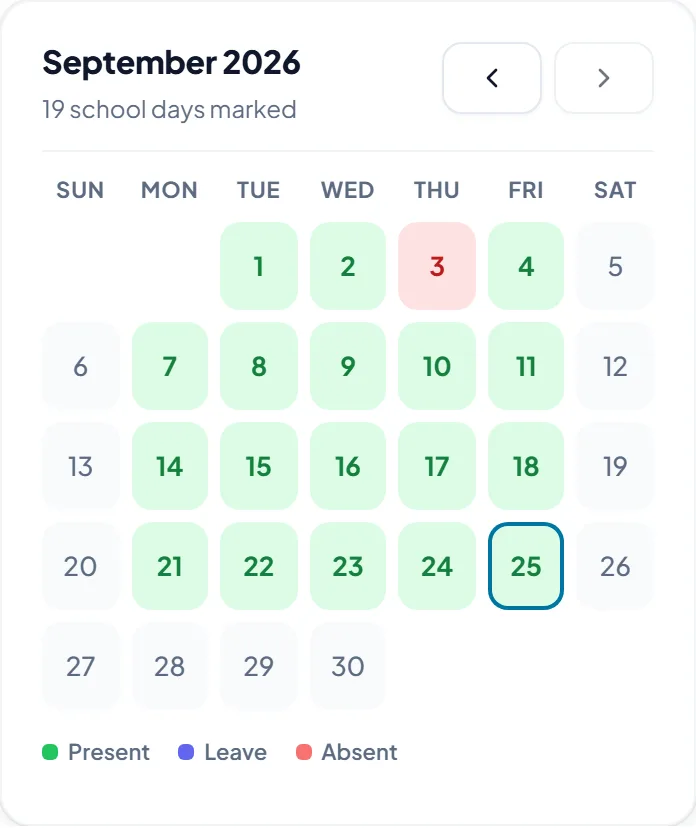
- A monthly attendance calendar for every child
- Call or WhatsApp the school straight from the app
- Nothing to download from an app store: it opens in the phone’s browser and can sit on the home screen
ID cards
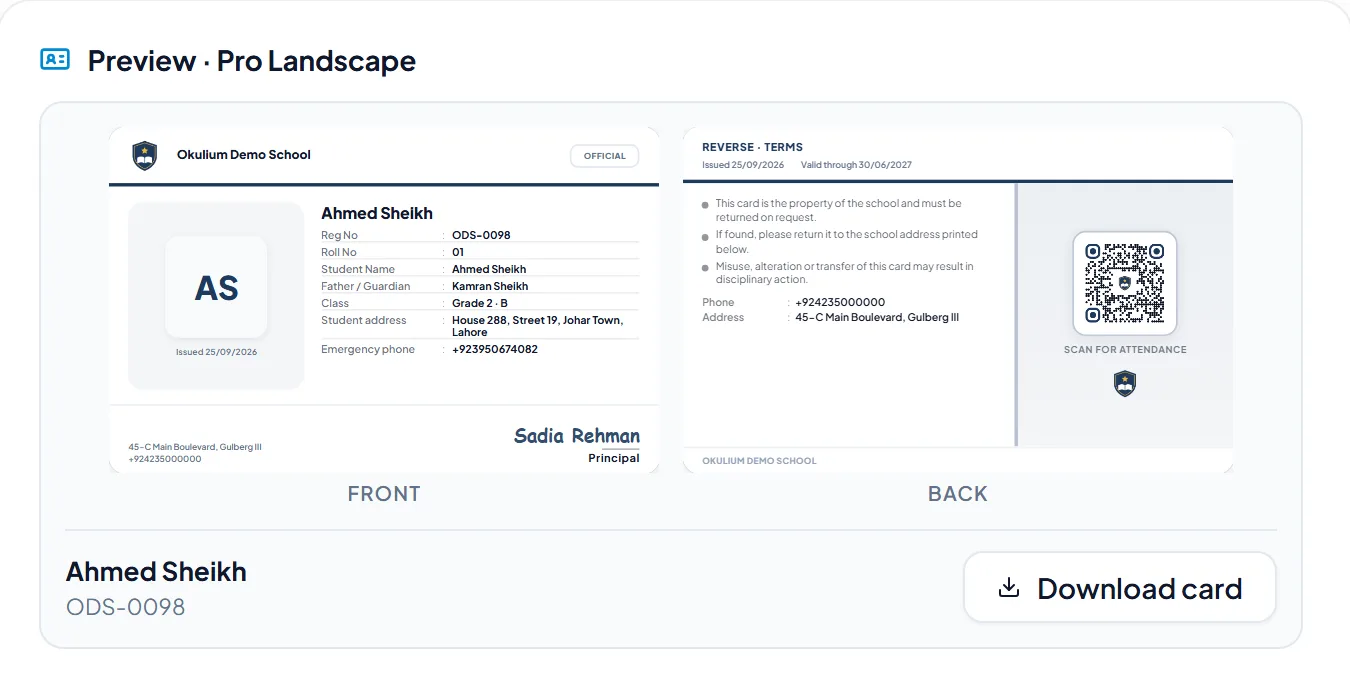
ID cards that take attendance too
Choose one of four designs, add your logo and the principal's signature, and print on A4 sheets or a card printer. The QR code on the back works with Okulium's attendance scanner.
- Student details filled in from their profile
- Print a whole class at once, or one card when someone loses theirs
AI AssistantNew
Ask your school a question, in English or Roman Urdu
Type it the way you would ask your office. Okulium picks the right report and answers from your own records, in seconds.
- Ask in plain words. Who was absent more than 3 days, who scored below 40% in Maths, whose fees are unpaid. Okulium answers from your own records.
- Report-card remarks. A short remark for every student in a section, in English or Urdu. Teachers edit and approve each one before it is saved.
- Smart school import. Moving from another system? The AI matches your column headings and class names to Okulium, without seeing the students in them.
An optional add-on, priced on its own and not part of the free trial. Ask us about AI
Private by design
Okulium checks every request before it leaves and stops it if anything personal slips in. A student you ask about is sent as a code, never by name.
Never sent to the AI
- Names
- Phone numbers
- CNIC and B-Form numbers
- Addresses
- Dates of birth
- Photos
- Roll and registration numbers
- Fee amounts
- Your school's name
Never changes your records
The AI only suggests. People check and decide.
Staff only
Parents never use it, and the school admin turns it on or off.
Every request on record
See exactly what was sent, for the last 90 days.
And much more
The rest of running a school, covered
The right view for every role
Owner, campus managers, class and subject teachers, the exam office and attendance substitutes each see only what their job needs.
Notices
Send a notice to staff, to every parent or to the parents of chosen sections, with a PDF or picture attached. Pin the important ones to the top.
School calendar
Holidays, terms, exams and events in one calendar. Parents see what is coming up in their app.
Reports
Students, attendance, fees, exams, staff and more. Every report exports to PDF and Excel.
Move in from your old system
Upload the Excel or CSV export from your old software. Okulium matches the columns and classes, keeps admission numbers, and brings in staff and unpaid dues.
The next school year
Start the next year with the same classes and subjects, then promote each section, with students kept back where needed.
More than one campus
Each campus keeps its own students, staff and fees, and the owner switches between them from the menu.
Any computer or phone
Nothing to install. Okulium runs in the browser, and can be added to a phone’s home screen like an app.
Private and protected
Each school's records are kept apart, passwords are never stored as plain text, and repeated wrong passwords lock the sign-in.
How it works
Up and running in three steps
Register your school
Enter your school, your campus and your own details. The 30-day trial starts straight away, with every feature switched on.
Set up your classes
The setup wizard adds your logo, academic year and classes. Pick subjects from ready-made sets, then import students from Excel or your old software, or add them one by one.
Bring in your staff and parents
Add teachers with their mobile numbers and hand them a first password. Parents' sign-in details come from each student's profile, ready to send on WhatsApp.
Pricing
Pay only for the students you have
One price per student each month. Start with Core and add what you need, or take everything for less. The bigger your school, the less each student costs.
Per student, per month
CoreAlways included
Students, staff, classes, attendance with QR scanning, notices, the dashboard and reports
Rs 15
Fees
Monthly fee vouchers, payments, receipts and fee reports
Rs 5
Exams & Results
Exams, marks entry, grades, positions and report cards
Rs 5
ID Cards
Student ID card designs with QR codes, ready to print
Rs 3
Everything together
All 4 modules, Rs 3 less per student than one by one
Rs 25instead of Rs 28
Bigger schools pay less
| Students 1–300 | Rs 25 |
|---|---|
| Students 301–600 | Rs 1540% off |
| Student 601 onwards | Rs 1060% off |
Each price is for the students in that range only, so your bill grows smoothly as you grow. Never more than Rs 15,000 a month per campus, however many students you have.
- 30-day free trial with every module
- No minimum: pay only for the students you have
- Pay yearly and get 2 months free
- Pay by bank transfer, Raast, JazzCash or Easypaisa
- The AI Assistant is an optional add-on, priced on its own
Work out your price
Rs 7,500 a month
Rs 25 per student a month × 300 students
Nothing to pay until your free trial ends.
FAQ
Questions schools ask us
Do we need to install anything?
No. Okulium runs in the browser on any computer or phone. Teachers and parents can add it to their home screen so it opens like an app.
How does the free trial work?
Every new school gets 30 days with every module switched on, and nothing to pay to start. Before the trial ends, choose your plan on the Billing page and pay the invoice.
How do we pay for Okulium?
Monthly, or yearly with 2 months free. Pay the invoice by bank transfer, Raast, JazzCash or Easypaisa, then enter the transaction ID in Okulium and we confirm it.
How are parents told when their child is absent?
As soon as the class teacher submits the register, the parents of absent children and children on leave see it in the Okulium app, and can turn on phone notifications. Okulium doesn't send SMS.
Can we move from our old software or Excel sheets?
Yes. Upload the Excel or CSV export from your old system. Okulium matches the columns and classes, keeps your admission numbers, creates parents' sign-ins and brings in staff and unpaid dues. You can also use our Excel template, or add students one by one.
What does the AI Assistant do?
Staff can ask about attendance, results, fees and student numbers in English or Roman Urdu, draft report-card remarks for a whole section, and get help matching columns when importing. It is an optional add-on priced on its own, and is not part of the free trial.
Does the AI see our students' personal details?
No. Names, phone numbers, CNIC and B-Form numbers, addresses, dates of birth, photos, roll and registration numbers, fee amounts and your school's name are never sent. Okulium checks every request and stops it if anything slips in, the AI never changes your records, and the school admin can see exactly what was sent.
We have more than one campus. Does that work?
Yes. Each campus keeps its own students, staff, attendance and fees, and the owner can switch between campuses. Tell us about your campuses and we will set them up for you.
Who can see what?
Teachers see only the classes they teach. Fees, staff and reports are for the owner and campus managers. Parents see only their own children, and no school can see another school’s records.
Can a teacher work at two schools?
Yes. A teacher who works at two Okulium schools, or a parent with children at both, signs in with one mobile number and one password and switches between schools.
Try Okulium with your own school
Register in a few minutes and use every feature free for 30 days. If you'd like help setting up, message us on WhatsApp.